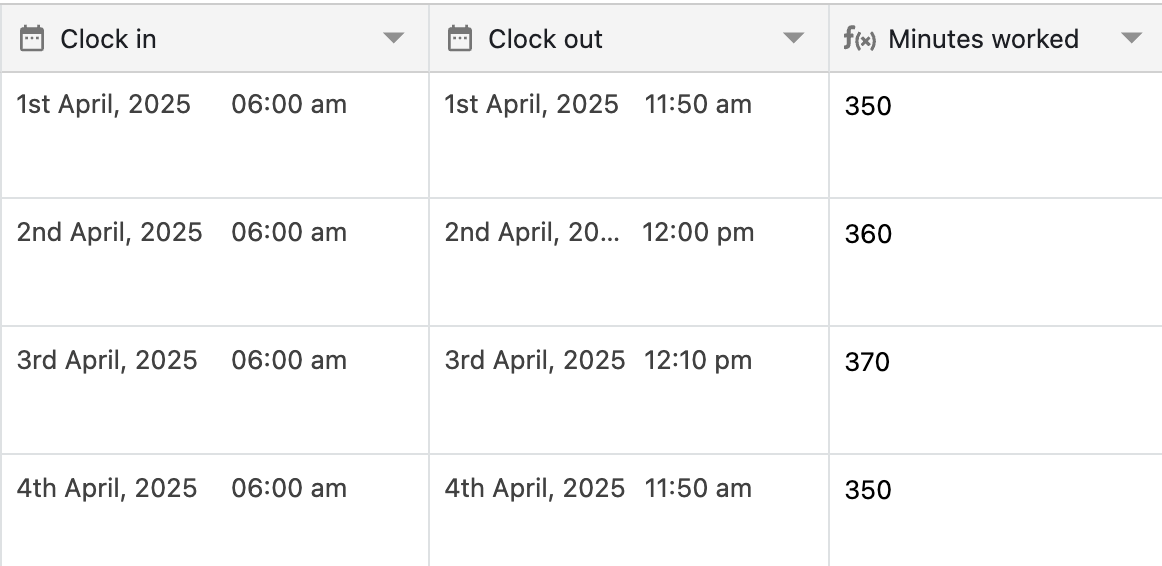
You can find the difference between two dates using DATE_DIFF formula function in Stackby.
Learn about the complete formula guide here
Learn about advanced formula guide here
Understanding the DATE_DIFF() function with examples
Using the DATE_DIFF() function in the example below, we'll find the difference - in days - between two dates.
DATE_DIFF({Start Date}, {End Date}, "days") 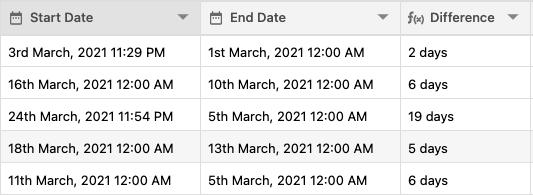
Another common use of DATE_DIFF() is to find the difference between a record's date and today's date. You can use DATE_DIFF() in combination with the TODAY() formula to dynamically find the difference from today's date.
DATE_DIFF(TODAY(), {End Date}, "days") Using the DATE_DIFF() function in the example below, we'll find the difference - in minutes - between two dates.
DATE_DIFF({Start Date}, {End Date}, "minutes") 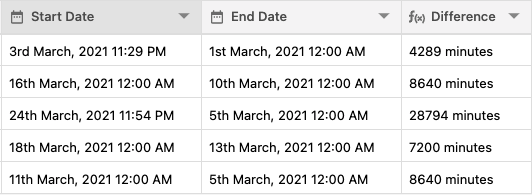
Using the DATE_DIFF() function in the example below, we'll find the difference - in seconds - between two dates.
DATE_DIFF({Start Date}, {End Date}, "seconds")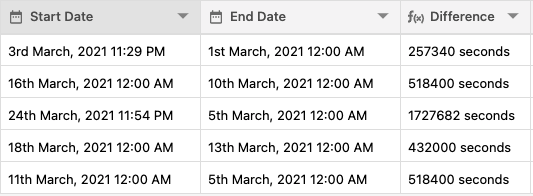
Displaying Date in Time Format
If you need to measure the time an employee spends working each day, you could create two date columns to track their clock-in and clock-out times.
You can also display the output in the time format, per the formula below:
DATE_DIFF({Clock out},{Clock in},"seconds")/60