
The Sort List action in Stackby Automations lets you sort an array of values mid-automation — before passing that sorted list to a subsequent action. This is especially useful when you're working with data from a "Find Records" step or a linked column and need results in a specific order.
What Is the Sort List Action?
When an automation step returns a list of records or values — for example, a "Find Records" action that returns multiple matching rows — those results may not be in the order you need. The Sort List action takes that array and reorders it by one or more fields before the next step uses it.
Common scenarios:
Sort found records by date to get the most recent one.
Sort a list of task names alphabetically before sending them in an email digest.
Sort deals by value (descending) to identify the top opportunity
How to Add a Sort List Action
Open your Stackby automation in the Automations panel.
After the step that produces a list of records (e.g., Find Records), click + Add Action.
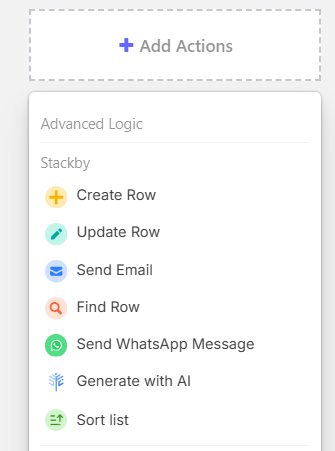
Select Sort List from the action type menu.
In the List to Sort field, reference the output from the previous step using the dynamic value picker (e.g.,
{{step2.records}}).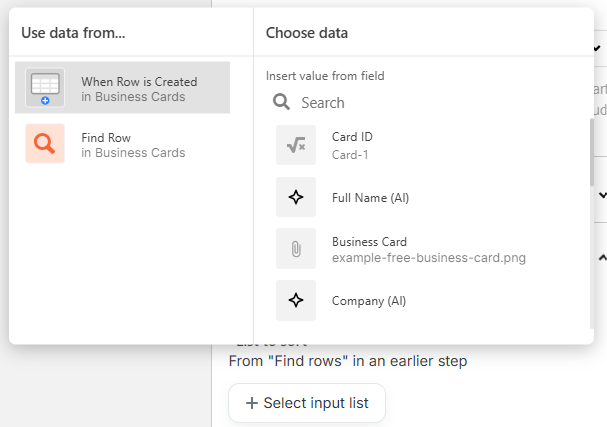
Click + Add Sort Criteria and choose the field to sort by.
Select the sort direction: Ascending (A→Z, 0→9, oldest→newest) or Descending (Z→A, 9→0, newest→oldest).
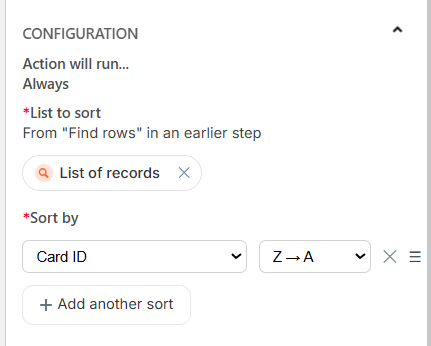
Add additional sort criteria if needed (secondary sort, tertiary sort, etc.).
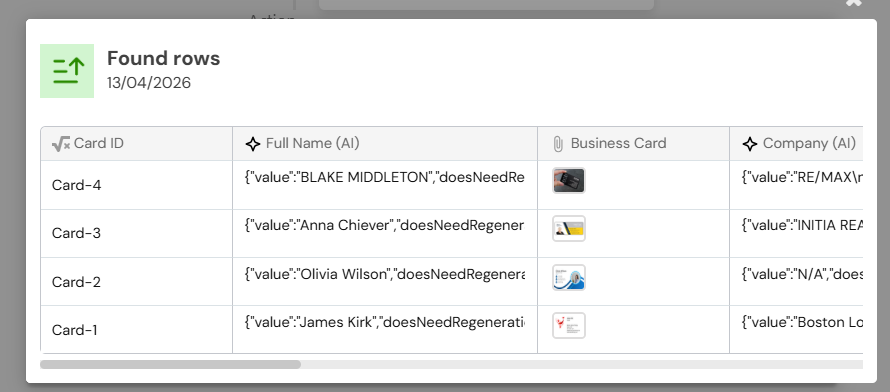
The sorted list is available as an output variable for all subsequent steps.
When to Use Sort List
The Sort List action is most useful when:
A previous action returns multiple records and you need them in a specific order.
You want to select the first or last item from a sorted list (e.g., the most recently modified record).
You're compiling a summary or digest that should be ordered (e.g., alphabetical task list in a notification).
You're feeding results into a loop or "For each" block and order matters