
Stackby makes it easy to convert your JSON files into structured database tables — with no coding required. Whether you're importing data from APIs or structured files, this tool helps you go from raw JSON to clean, editable data in seconds.
How to Use the Tool
1. Upload Your JSON File
Click the “Click or drag & drop file here” area to upload your .json file.
Once uploaded, Stackby will parse the JSON structure into rows and columns.
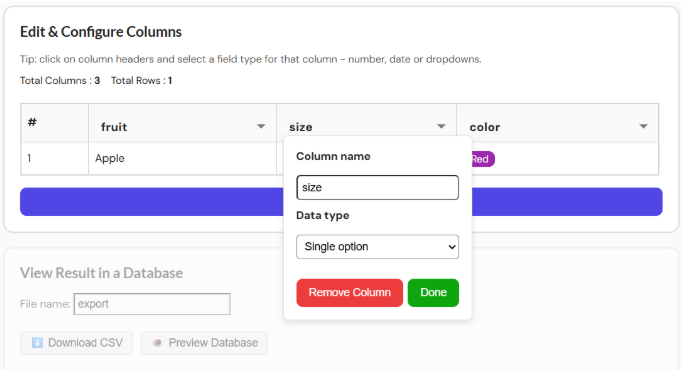
2. Edit Your Data: After uploading, the tool shows a preview:
Total Columns: based on JSON keys
Total Rows: based on array items in JSON
You can Click on each column to:
Rename the field
Set the data type (number, date, dropdown, etc.)
Remove any unwanted columns
3. View Result
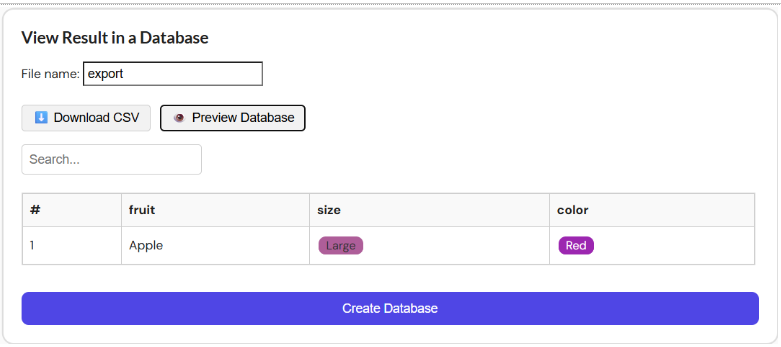
At the bottom of the interface:
File name: Automatically set to export (you can rename it)
Options to:
Download CSV — for offline access or upload to other platforms
Preview Database — view how your converted JSON appears in a database format within Stackby
Click on this link to upload your JSON file, and Stackby will convert it into a database.