
The Excel to Database tool by Stackby helps you convert .xlsx or .xls files into structured, database-ready formats like CSV or JSON — with no coding or technical setup required.
Whether you're migrating data, cleaning spreadsheets, or preparing structured inputs for applications, this tool offers a fast and intuitive way to handle Excel files.
How to Use the Tool
Step 1: Upload Your Excel File: Drag and drop or select your file from the system.
Step 2: Click Next: After uploading, click the Next button to begin data processing.
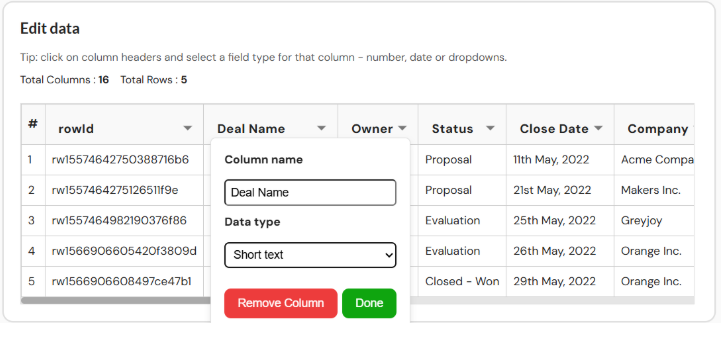
Step 3: Edit Columns (if needed): You will be taken to a view where you can:
See your table’s column headers and values
Click on column headers to define their field types (e.g., Text, Number, Date, Dropdown)
Clean or transform your data for database use
Step 4: View & Export Results: Once you’ve reviewed your data:
Enter a name for the output file (e.g., SalesDataExport)
Click Preview Database to see the structured format
Use Download CSV or Export to JSON to save your file